A Professional's Take on the New Aerox 9 Wireless
In the evolving landscape of high-performance peripherals, the intersection of weight reduction and functional complexity has long been a point of friction for hardware engineers. High-intensity gaming and professional multitasking environments often demand two historically opposing features: an ultra-lightweight chassis for rapid movement and an extensive array of programmable buttons for complex macro execution. For years, users in the Massively Multiplayer Online (MMO) and Multiplayer Online Battle Arena (MOBA) categories were forced to accept heavy, "brick-like" mice in exchange for the side panels required to manage dozens of spells, shortcuts, or spreadsheet commands. The SteelSeries Aerox 9 Wireless represents a definitive structural challenge to this status quo, attempting to bridge the gap between "lightweight speed" and "utility-heavy versatility" in a single, professional-grade shell.
The Aerox 9 Wireless is not merely a refinement of a previous model but a specialized adaptation of the Aerox honeycomb philosophy applied to a niche that has traditionally been ignored by the lightweight movement. As modern workspaces and competitive gaming scenes become increasingly streamlined, the demand for tools that do not sacrifice performance for ergonomics has never been higher. This analysis explores the technical architecture, the real-world ergonomics, and the professional applications of a mouse that aims to be everything at once: a featherweight speedster and a command center for the thumb.
Architecture and Engineering: The Holey Grail
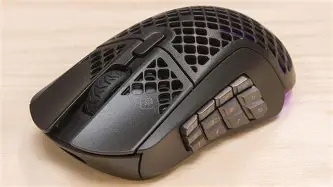
At the heart of the Aerox 9 Wireless is its "Holey" shell design. Utilizing a precision-engineered ABS plastic honeycomb pattern, SteelSeries has managed to strip the weight down to approximately 89 grams. While this might seem heavy when compared to the 60-gram "super-light" FPS mice on the market, it is revolutionary for the MMO/MOBA category. Competitors in this space frequently weigh between 110 and 130 grams. Reducing this weight by 20% to 30% significantly reduces inertial resistance, allowing for longer gaming or work sessions with less repetitive strain on the wrist and forearm.
Professional users often worry about the durability of such an open-concept design. Dust, skin cells, and the occasional coffee splash are real-world hazards for any desk-bound professional. To address this, the Aerox 9 features "AquaBarrier" technology. This is an IP54-rated protection layer that shields the internal circuitry from environmental damage. While the mouse is not waterproof, it is effectively resistant to the standard debris and moisture that would otherwise compromise an open-shell electronic device. From an engineering perspective, this allows for the aesthetic and weight benefits of the honeycomb structure without the typical fragility associated with early lightweight prototypes.
Sensors and Connectivity: Precise Input for High Stakes
The device utilizes the TrueMove Air sensor, a custom-collaboration sensor that provides 1-to-1 tracking accuracy. For professionals involved in graphic design or precision video editing, the ability to rely on pixel-perfect movement is non-negotiable. With a sensitivity range of up to 18,000 CPI (Counts Per Inch), 400 IPS (Inches Per Second), and 40G acceleration, the technical ceiling of this hardware far exceeds the physical capabilities of even the fastest human operators. This ensures that the hardware is never the bottleneck in a fast-paced environment.
Connectivity is handled via a dual-protocol system: Quantum 2.0 Wireless and Bluetooth 5.0. The Quantum 2.0 2.4GHz connection provides the low-latency performance required for competitive play, effectively matching the speed of a wired mouse. For the traveling professional, the inclusion of Bluetooth allows the Aerox 9 to connect to laptops or tablets without the need for a USB dongle, making it a versatile tool for commuting or working in various office settings. Switching between devices is managed via a physical toggle on the underside, allowing for a seamless transition from a primary workstation to a secondary mobile device.
Ergonomics and the 12-Button Side Panel
The defining feature of the Aerox 9 is undoubtedly the side-mounted 12-button grid. For those unfamiliar with MMO mice, this layout provides an entire numerical row (plus two extra) directly under the thumb. In professional use cases, these are rarely used just for numbers. Video editors map these to timeline trimming tools, ripple deletes, and color grading shortcuts. Financial analysts map them to complex Excel macros. Programmers use them to cycle through terminal windows or execute build scripts.
However, the transition to a lightweight shell changes the ergonomic profile of this button grid. In heavier mice, the weight provides a counterbalance that allows for heavy thumb pressure without accidentally shifting the mouse across the pad. With the Aerox 9, the low weight requires a more refined touch. The tactile feedback of the side buttons is clicky and distinct, which is vital for developing muscle memory. The orientation of the buttons is slightly curved to follow the natural sweep of the thumb, though users with smaller hands may find the forward-most buttons (1, 2, and 3) a slight reach during high-stress moments.
The Power of Customization via Software
To truly unlock the potential of the Aerox 9, one must engage with the SteelSeries Engine software. This interface allows for the remapping of all 18 buttons. Crucially for the professional, the software supports multiple profiles that can be set to trigger automatically when specific applications are launched. One might have a profile for Adobe Premiere Pro where the tilt-click scroll wheel handles horizontal timeline scrolling, and another profile for a web browser where the side buttons manage tab navigation and "back/forward" functions. The inclusion of a tilt-click scroll wheel—adding two more axes of input—further solidifies the Aerox 9 as a powerhouse for productivity.
Find top-rated Electronics products at great prices.
See Deals →Real-World Comparison: Lightweight vs. Traditional MMO Mice
To understand where the Aerox 9 fits in the current market, it is helpful to compare its specifications against the traditional standards of the "Command Center" mouse category. The following table highlights the shift in design philosophy.
| Feature | Traditional MMO Mouse | SteelSeries Aerox 9 Wireless | Impact on User |
|---|---|---|---|
| Weight | 110g – 135g | 89g | Less fatigue, faster flick movements. |
| Protection | Standard Sealed Shell | IP54 AquaBarrier | Water and dust resistance in a breathable shell. |
| Button Count | 15 – 20 | 18 | Maintains high utility while dropping weight. |
| Battery Life | 20 – 60 Hours (Wireless) | Up to 180 Hours | Significantly less frequent charging. |
| Connectivity | 2.4GHz Only | 2.4GHz & Bluetooth | Better for multi-device workflows. |
A Detailed Look at Pros and Cons
Every piece of hardware involves trade-offs. While the Aerox 9 is a technical marvel, certain design choices may not appeal to every user base. Below is a breakdown of the strengths and weaknesses of the device from a professional perspective.
Pros
- Unparalleled Lightness: At 89 grams, it is currently the lightest 12-button side panel mouse on the market, offering a significant ergonomic advantage for long-term health.
- Exceptional Battery Performance: The 180-hour battery life ensures that professionals can go through a full work week (and then some) without reaching for the USB-C charging cable.
- Fast Charging: A quick 15-minute charge provides roughly 40 hours of gameplay or work, minimizing downtime significantly.
- AquaBarrier Utility: The IP54 rating provides peace of mind for those who work in environments where dust or minor spills are a possibility.
- Versatile Connectivity: The ability to toggle between high-performance 2.4GHz and widely compatible Bluetooth makes it an ideal "one-mouse" solution for various devices.
- PTFE Glide: The 100% Virgin Grade PTFE feet provide a remarkably smooth glide across both cloth and hard surfaces, further enhancing the lightweight feel.
Cons
- Button Learning Curve: The 12-button grid is dense. For users not accustomed to this layout, it can take several weeks to build the muscle memory required to avoid misclicks.
- Size Constraints: The mouse is relatively long and has a "low-hump" profile. This is excellent for palm and claw grips but may feel awkward for individuals with very small hands using a fingertip grip.
- Cleaning Complexity: While the internals are protected, the honeycomb shell itself can accumulate dust or debris in the crevices, requiring occasional compressed air cleaning to maintain aesthetics.
- Software Dependence: To use the advanced macros and profiles, the SteelSeries software must be running, which adds a (minor) layer of background resource usage on the host PC.
The Professional Buying Guide: Is This Right for You?
Choosing a peripheral is a personal decision, but for professionals, it should be a data-driven one. When considering the Aerox 9 Wireless, potential buyers should evaluate their needs based on three primary pillars: Workflow Complexity, Ergonomic Requirements, and Environmental Versatility.
1. Workflow Complexity
If your daily tasks involve repetitive shortcuts or navigating complex software interfaces, the Aerox 9 is a force multiplier. If you find yourself frequently using Ctrl+C, Ctrl+V, Ctrl+Z, and various function keys (F1-F12), those actions can be offloaded to your mouse hand. This frees up your keyboard hand to stay on the "home row" or move to a separate editing deck. However, if you primarily use a mouse for simple clicking or basic web browsing, the 12-button side panel may be overkill and potentially distracting.
2. Ergonomic Requirements
Weight is the invisible enemy of the modern professional. Repetitive Strain Injury (RSI) and Carpal Tunnel Syndrome are often exacerbated by the constant acceleration and deceleration of heavy objects. If you have ever felt a dull ache in your wrist after an eight-hour shift, switching to a lightweight mouse like the Aerox 9 is a proactive health choice. The effort required to stop and start movement is drastically reduced, leading to a "floaty" sensation that many find therapeutic for their joints.
3. Environmental Versatility
Consider your workspace. Do you move between a home office, a corporate office, and coffee shops? The combination of Bluetooth and a lightweight frame makes the Aerox 9 an excellent travel companion. It fits easily into a bag and doesn't require a dedicated mouse pad to function reasonably well (though one is recommended for precision work). Conversely, if you have a purely static setup and don't care about weight, you might prefer a heavier, more conventionally "stable" mouse.
Advanced Use Cases: Beyond Gaming
While marketed toward the gaming community, the Aerox 9 has found a cult following in various technical industries. Let's look at how specific professionals are utilizing this hardware.
Software Development
Developers often live in Integrated Development Environments (IDEs) where they constantly switch between files, debug code, and run tests. Mapping "Step Over," "Step Into," and "Step Out" to the side buttons changes the debugging experience from a keyboard-clutter chore to a streamlined process. The tilt-click wheel is also frequently mapped to "Go Back" and "Go Forward" in code navigation, allowing a dev to fly through a massive codebase with one hand.
Shop the latest Electronics picks on Amazon.
Shop Amazon →CAD and Engineering
In Computer-Aided Design (CAD), the number of specialized tools is immense. The Aerox 9 allows for the mapping of common constraints (Parallel, Perpendicular, Tangent) or view toggles directly to the mouse. The lightweight nature of the mouse is particularly useful here, as CAD work often involves many small, precise movements over hours. Reducing the drag of the mouse makes these precision tasks feel more natural and less labored.
Digital Content Creation
For streamers and content creators, the Aerox 9 can act as a mini Stream Deck. Buttons can be mapped to toggle scenes in OBS, mute a microphone, or trigger on-screen alerts. Because it is wireless, it doesn't add to the cable clutter that often plagues a professional streaming desk. The RGB lighting, while often considered "gamer-focused," can also be programmed to change colors based on the active profile, giving the user a visual cue of which set of macros is currently active.
Maintenance and Longevity Tips
To ensure the Aerox 9 Wireless serves a professional for several years, a few maintenance habits are recommended. Because of the open-shell design, it is wise to keep a can of compressed air nearby. A quick blast once a month is usually sufficient to keep the internal cavity clear of dust. Since the switches are rated for 80 million clicks (Golden Micro IP54 Switches), the mechanical longevity of the primary buttons is likely to outlast the computer it is connected to. The PTFE feet are replaceable, and if they start to feel scratchy after a year of heavy use on a hard surface, swapping them out will restore the "out of the box" glide sensation.
In terms of battery health, it is generally recommended to use the 2.4GHz mode for work and gaming for the best performance, but to switch to Bluetooth for casual browsing or travel to maximize the power-saving features. The SteelSeries Engine also allows for an "Illumination Dimming" setting, which dims the lights after a period of inactivity—a feature every professional should enable to squeeze the most life out of every charge cycle.
Conclusion
The SteelSeries Aerox 9 Wireless stands as a testament to the fact that specialized tools do not have to be cumbersome. By marrying the weight-saving innovations of the FPS world with the button-dense utility of the MMO world, SteelSeries has created a unique hybrid that serves a surprisingly wide array of users. It challenges the notion that a professional mouse must be a solid, heavy object. Instead, it offers a breathable, fast, and highly customizable alternative that respects the ergonomic needs of the user as much as its functional requirements.
For the professional who demands high performance and deep utility, the Aerox 9 represents a significant upgrade over traditional designs. It requires a brief period of adaptation, particularly for those moving from a standard office mouse, but the rewards are substantial: reduced fatigue, streamlined workflows, and a level of precision that makes the tool vanish into the hand. In an era where we spend thousands of hours behind a screen, investing in a device that prioritizes both our health and our efficiency is not just a luxury—it is a logical step toward a more refined professional environment.